Restaurant Menu Engineering: Using Cost Data to Boost Profit
Menu engineering uses profitability and popularity data to optimize every item on your menu. Learn the Stars, Puzzles, Plowhorses, Dogs framework and how to use it.
Most restaurant menus are built by intuition. A chef loves a dish and puts it on the menu. A bestseller stays indefinitely. Prices get rounded to feel competitive. There's no system, and as a result, restaurants leave significant money on the table.
Menu engineering is the systematic approach to designing a menu that maximizes profitability based on actual data. It was developed in the 1980s by Michael Kasavana and Donald Smith at Michigan State University, and it remains the most widely adopted menu analysis framework in food service management.
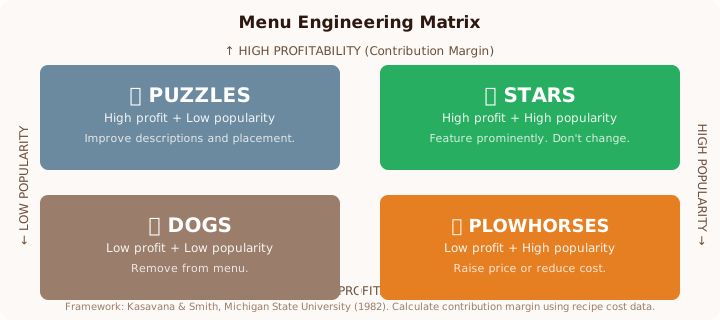
The foundation is simple: every menu item sits somewhere on a matrix of two variables, how profitable it is and how popular it is. Where it sits tells you exactly what to do with it.
The Four Categories
Stars: High profitability, high popularity. These are your best items, they make you money and customers love them. They're easy to sell, they make people happy, and each sale generates strong contribution margin.
Strategy: Feature these prominently. Put them in the eye-scan path (top-right corner of a two-panel menu is most-read). Train servers to suggest them. Don't change them.
Puzzles: High profitability, low popularity. These items make great margin but for some reason aren't selling well. It might be a description problem, a placement problem, or a serving staff awareness gap.
Strategy: Invest in these. Improve the menu description, move them to a better position, add a photo or visual callout, train servers to mention them. Don't cut a high-profit item because it sells slowly, fix the selling problem first.
Plowhorses: Low profitability, high popularity. Popular items with thin margins. Customers love them, which makes them hard to remove, but they're dragging your average contribution margin down.
Strategy: Three options: raise the price (if demand is inelastic), reduce the cost (reformulate the recipe, find a cheaper protein equivalent, reduce portion size slightly), or reposition it as a loss-leader that drives high-margin add-ons (wine, appetizers, desserts).
Dogs: Low profitability, low popularity. Items that neither make money nor move. They're cluttering your menu and increasing your inventory complexity.
Strategy: Remove them. Every dog on your menu adds complexity (ordering, storage, prep time, training) for no return.
Step 1: Calculate Contribution Margin for Every Item
To build the matrix, you need two numbers for every item:
1. Contribution margin (revenue per sale minus food cost per sale)
2. Sales count (how many times you sold it in a given period)
Contribution margin formula:
Menu Price – Cost Per Serving = Contribution Margin
A pasta dish at $18 menu price with a $4.50 cost: $18 – $4.50 = $13.50 contribution margin
A salmon at $32 with a $12.00 cost: $32 – $12.00 = $20.00 contribution margin
Even though the salmon has a higher food cost in absolute dollars, it generates more contribution margin per sale. Food cost percentage alone doesn't tell you this, contribution margin does.
Use our recipe cost calculator to get accurate cost-per-serving figures for every dish. Without precise costs, contribution margin analysis is just guesswork.
Pull your sales counts from your POS for the same period (typically 4–12 weeks). A 4-week snapshot is usable but short; 12 weeks is better for items with high day-of-week variability.
Step 2: Define Your Thresholds
To categorize items into the four quadrants, you need to define what counts as "high" vs. "low" for both profitability and popularity.
Profitability threshold: Calculate the average contribution margin across your entire menu. Items above average are "high profitability"; below average are "low profitability."
Popularity threshold: Calculate the average number of items sold. Typically, an item is considered "popular" if it accounts for more than (100% ÷ number of menu items × 70%) of total items sold. This 70% figure is the standard Kasavana-Smith threshold.
For example, if you have 20 menu items and sold 1,000 total items over 4 weeks, the average is 50 per item. Popularity threshold: (100% ÷ 20) × 70% × 1,000 = 35 items. Any item selling more than 35 is "high popularity."
Step 3: Plot Your Menu Matrix
Now plot every item on the matrix using your contribution margin (Y axis) and sales volume (X axis). Items in each quadrant get their category label.
Example analysis (30-seat casual restaurant, 4 weeks):
| Menu Item | Price | Cost | CM | Units Sold | Category |
|---|---|---|---|---|---|
| Pasta Marinara | $16 | $3.20 | $12.80 | 186 | Star |
| Salmon with Asparagus | $32 | $11.50 | $20.50 | 42 | Star |
| Mushroom Risotto | $24 | $4.80 | $19.20 | 28 | Puzzle |
| Classic Burger | $18 | $7.10 | $10.90 | 224 | Plowhorse |
| Chicken Caesar Salad | $17 | $4.80 | $12.20 | 38 | Plowhorse |
| Lamb Shank | $44 | $18.00 | $26.00 | 9 | Puzzle |
| Vegetable Stir-Fry | $15 | $4.20 | $10.80 | 21 | Dog |
| Tuna Tartare | $22 | $9.40 | $12.60 | 12 | Dog |
In this example: The mushroom risotto has an outstanding $19.20 contribution margin but sells only 28 units, a Puzzle worth solving. The burger is beloved but needs cost work at only $10.90 CM. The stir-fry and tuna tartare should be evaluated for removal or reformulation.
Engineering Each Category
Making Stars Shine Brighter
Your Stars are doing the work. Don't mess with the recipe, but do:
- Place them in prime menu real estate (top-right, or boxed/highlighted)
- Write compelling descriptions that justify the price ("Wild Pacific salmon, grilled over white oak, finished with preserved lemon butter")
- Train servers to mention them naturally ("Our salmon has been wildly popular this week if you're looking for something lighter")
Resist the urge to raise Star prices aggressively. A Star's popularity is partly price-driven, push too hard and you push it into Puzzle territory.
Turning Puzzles Into Stars
High-profit, low-selling items often have a communication problem. Start here:
- Rewrite the menu description. "Mushroom Risotto" is forgettable. "Wild mushroom risotto with truffle oil and aged Parmesan, finished with a 90-second sauté" is evocative.
- Move it. The first item under an entrée header gets 25–30% more orders than the second item. Move your Puzzle to that first position.
- Add a visual. A small food photo or illustrated icon next to a Puzzle item increases orders 30–40% according to Cornell research.
- Create a server incentive. A one-week "sell 10 mushroom risottos and earn a bonus" contest for your service team can dramatically change a Puzzle's trajectory.
Fixing Plowhorses
Your popular-but-low-margin items are tricky because you can't just cut them. Three approaches:
Price test: Raise the price $1–$2 and track volume for 4 weeks. If a burger drops from 224 to 210 units, you've lost 14 units × $18 = $252 in revenue but gained the price increase across 210 remaining units × $2 = $420 in additional contribution margin. That's a net win.
Reformulate: Can you source a slightly less expensive protein, reduce portion by 0.5 oz, or eliminate a garnish that costs $0.40/plate? Run every cost-reduction idea through the recipe cost calculator to see what it does to the CM before implementing.
Bundle: Pair Plowhorses with high-margin add-ons. "Burger + Beer + Fries" combos often carry higher margin than individual items because the beverage and dessert elements improve the overall contribution margin mix.
Handling Dogs
The hard truth about Dogs: most should be cut. Every item removed from your menu:
- Reduces inventory complexity (fewer items to order, receive, and store)
- Eliminates training requirements for kitchen and front-of-house
- Reduces the risk of that item going out-of-date and generating waste
When evaluating a Dog for removal, consider:
- Is it on the menu for a specific customer segment (dietary, cultural, family request)?
- Is it a signature dish or brand identity item that loses you business if removed?
- Could it work better as a limited-time special rather than a permanent menu item?
If none of those apply, cut it. Most restaurants are over-menued, fewer, better-executed items almost always outperform more options.
How Often to Run Menu Engineering Analysis
Do a full matrix analysis every 4–6 months, or after any significant event:
- Seasonal menu change (quarterly for seasonal menus)
- After a significant ingredient price change
- After you introduce new items
- After a major operational change (new chef, new kitchen equipment)
The process should take 2–3 hours once you have your data organized. You can do a lighter "spot check" monthly by just tracking contribution margin on your top 10 selling items and flagging any that drift below your average.
The Financial Case for Menu Engineering
A study published in the Cornell Hospitality Quarterly found that restaurants implementing systematic menu engineering increased revenue by an average of 15% within 6 months. The improvement came from a combination of better item placement, price optimization, and removing menu friction.
For a restaurant doing $80,000/month in revenue, 15% = $12,000 in additional monthly revenue, without adding a single customer.
Start with accurate cost data from our recipe cost calculator. Without that foundation, every other analysis is built on sand. Once you know your real contribution margins, the matrix almost tells you what to do.
Research and Reading List
- Kasavana, M.L. & Smith, D.I., Menu Engineering: A Practical Guide to Menu Analysis (Michigan State University, 1982)
- Cornell University Center for Hospitality Research, Menu Design and Revenue Management
- National Restaurant Association, Menu Strategy Guide (restaurant.org)
Ready to cost your recipes?
Use our free calculator to get total cost, food cost %, and suggested menu price in seconds.
Calculate Recipe Cost (Free) →